

Hand off and ask
Two sessions often need each other. One has read the whole subsystem; the other is about to change it. Offsite has two moves for that, both on the card’s More Actions menu.
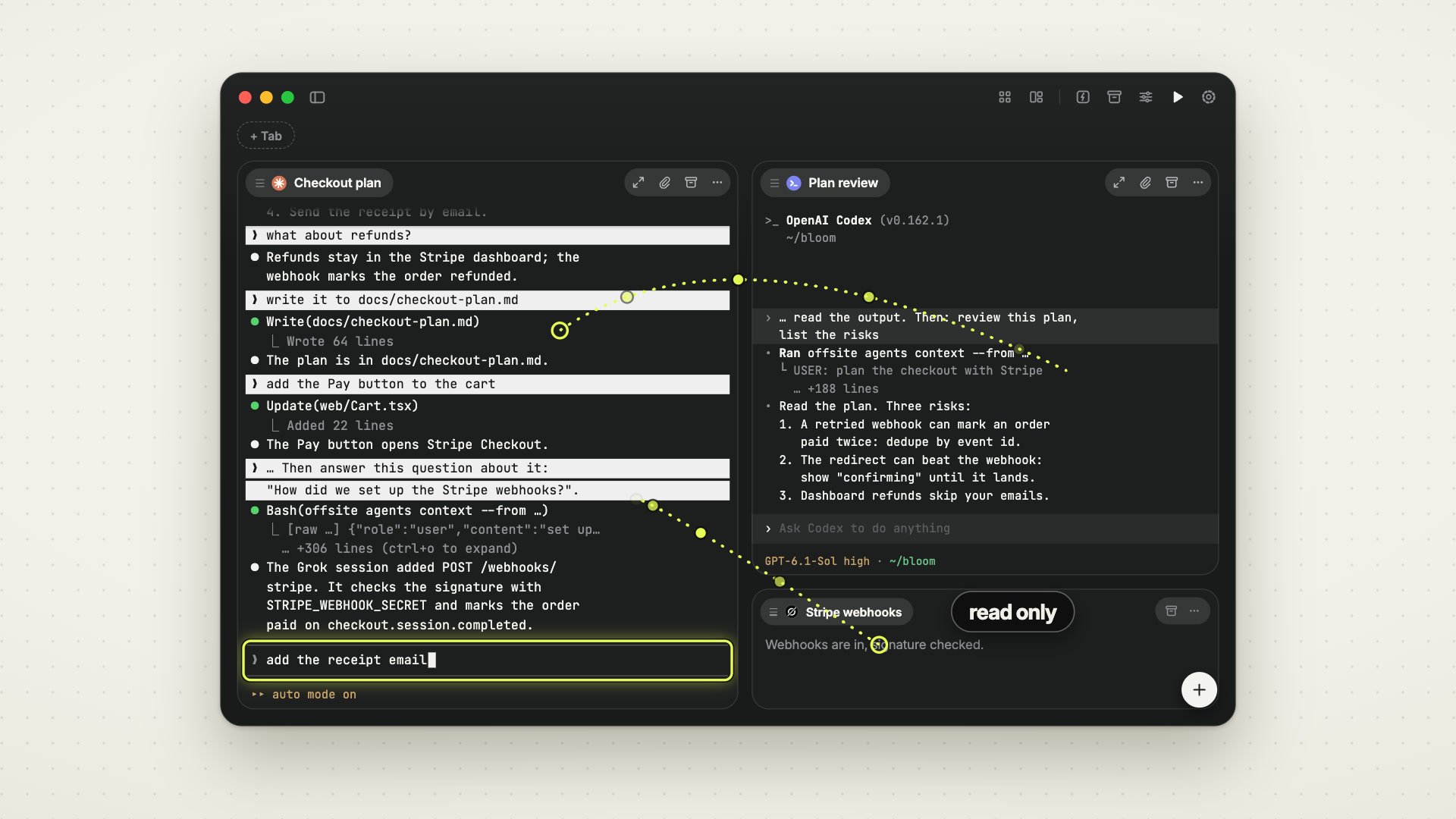 0:55
0:55
Ask another session
Section titled “Ask another session”Ask another session… gets you context from another agent session without
leaving the card you are on. Pick the session, type your question or leave it
empty for a summary, and the app puts a prompt into this card’s session. Its
agent reads the other session’s transcript with offsite agents context and
answers right here.
Use it for “what did the other agent conclude about the migration?” without switching cards, re-reading a long scrollback, or interrupting anything. The other session is not touched; it does not even know it was read.
You can ask the running agent sessions of the same project: this workspace and the worktrees of its repository. A Codex session can be asked once its first turn has given Offsite its CLI session ID. With no session to ask, the entry is greyed out.
Hand off to a new session
Section titled “Hand off to a new session”Hand off to a new session… works the other way round: it starts a fresh session that pulls the current session’s context and continues from there.
Pick the agent that takes over, Claude Code, Codex or Grok, with its model, its effort and YOLO if you want it. Then write what it should do, or leave the message empty to continue the work. The new session starts in the same workspace, loads this session’s context first and then follows your message.
Use it when a conversation has grown long, or when the next phase of work deserves a clean slate that still knows what happened.
Why handoffs go to a new session
Section titled “Why handoffs go to a new session”Offsite deliberately cannot deliver a message into an existing session.
That capability existed and was removed in August 2026, for a concrete reason: delivering text into a running agent means typing into its terminal, and a terminal is a shared channel. A delivery arriving while the user had a half-written prompt in the same input merged with that draft and was submitted as one prompt, with the user’s authority. No amount of care at the sending end fixes that; the channel itself is the problem.
So the rule is now structural: a session may read another session, never write into one. Handoffs create a new session that pulls context, which has no shared input to collide with.
For agents
Section titled “For agents”An agent running inside an Offsite session can do the read side itself:
offsite agents list # the user's other agent sessions, with activityoffsite agents context # another session's transcript, normalizedThere is no send. See Offsite for agents.
Ask an agent for a handoff (“carry on in a new session”) and it starts the new session itself, with the same pull of context; see Agents that steer Offsite.
Details
Section titled “Details”agents listreports each visible agent session with an activity ofbusy,attentionoridle, derived from the same turn state that drives notifications.- Session selectors resolve by id, id prefix, then name; running sessions are matched before stopped ones so a dead session cannot shadow a live one.
- Transcript reads are capped (4 MB tail, blocks trimmed to 2000 characters, tool output to 300) so a huge conversation cannot blow up the caller’s context.
- Reads act as the calling session’s agent, identified by
OFFSITE_SESSION_ID— never as one of your paired devices. That keeps a read from being mistaken for you looking at a card, which matters for attention handling.