Claude Code on your iPhone: every way to do it, compared
Claude Code needs you for a moment, and you are away from the desk. Every way to reach it from an iPhone, from SSH and mosh to Remote Control, compared.
Claude Code works for an hour on its own and then needs you for ten seconds: a permission prompt, a question about the API, a diff to approve. Those ten seconds rarely come while you sit at your desk. If answering means walking back to the laptop, the agent waits until you do.
As of October 2026 there are several ways to reach Claude Code from an iPhone. They differ in where the agent runs and in what the phone can do.
What you need from Claude Code on a phone
Five things decide whether a setup holds up away from the desk:
- Your machine and your repo. Your files, MCP servers, environment and local tools.
- Keys for a CLI. A terminal needs
Esc,Tab, arrows andCtrl, which a touch keyboard lacks, unless the app replaces the terminal with its own interface. - A session that survives the network. You walk from Wi-Fi onto mobile data, the train enters a tunnel, the phone locks.
- Pictures for the agent. A screenshot of a bug, a photo of a whiteboard.
- A look at the result. The diff, and ideally the running app.
SSH from an iPhone, with tmux and mosh
The classic route is SSH. Turn on Remote Login on the Mac (Apple’s guide), start claude inside tmux so it keeps running when you disconnect, and connect from a terminal app on the phone.
Add mosh and the connection follows you: it “automatically roams as you move between Internet connections” and resumes when the network comes back. It needs mosh-server on the Mac and UDP ports 60000 to 61000 open. Mosh syncs only the visible screen, so your scrollback lives in tmux.
Three iPhone apps that speak mosh:
- Blink Shell: SSH and mosh, Ed25519 keys, tunnels and support for hardware keyboards. Two weeks free, then $19.99 a year.
- Prompt 3 by Panic: SSH, mosh and Eternal Terminal, one purchase for iPhone, iPad and Mac.
- Moshi: “designed for Claude Code, Codex, and more”, with
Ctrl,Esc,Tab, arrows and tmux shortcuts on a key row, on-device Whisper dictation and a push notification when a task completes. Free with in-app purchases.
This route runs every CLI, Codex and Grok included, on your own machine. You set up the pieces yourself: Remote Login, keys, tmux, mosh, a firewall rule. Pictures reach the agent once you copy them over, and the running app reaches you once you forward its port.
Tailscale: reach your machine from anywhere
At home your phone finds the Mac on the local network. Everywhere else it needs a path. Tailscale connects your devices in one mesh network, at home and away; the free Personal plan covers up to 6 users and unlimited devices. Pair it with any SSH app above.
Remote Control and cloud sessions in the Claude app
Anthropic’s own answer lives in the Code tab of the Claude app. In the words of the docs, the app “is a client for Claude Code sessions rather than a place where code runs”, and it reaches two kinds of session.
Remote Control drives a session on your machine. Run claude remote-control, or /remote-control in an open session, and scan the QR code. Your files, MCP servers and tools stay available, you can attach photos and files from the phone, and Claude can send a push notification when a task finishes or needs a decision. It works on Pro, Max, Team and Enterprise plans. If your laptop sleeps or the network drops, Claude Code reconnects when the machine is back; the claude process itself has to keep running, and on a remote machine the docs suggest tmux or screen. While connected, Anthropic stores the transcript to keep your devices in sync.
Cloud sessions, also called Claude Code on the web, run in a VM that Anthropic manages and keep going after you close the laptop. They clone your repository from GitHub, show a diff you can comment on line by line, open the pull request, and claude --teleport pulls a session into your terminal later.
Both use the Claude app’s own interface, with no terminal keys to miss, and both are for Claude Code.
Codex in the ChatGPT app
If Codex is your agent, the ChatGPT app on the iPhone connects to a Mac or Windows PC running the ChatGPT desktop app, paired once with a QR code from the desktop. From the phone you approve commands and review outputs, diffs, test results, terminal output and screenshots. The same app also runs Codex tasks in the cloud.
Happy: an open-source client
Happy is a free, MIT-licensed app for iOS and Android. You start your agent through its CLI, happy claude or happy codex, and pick up the session from the phone, end-to-end encrypted. It signs in with the subscription you already have.
Offsite: the real terminal on every device
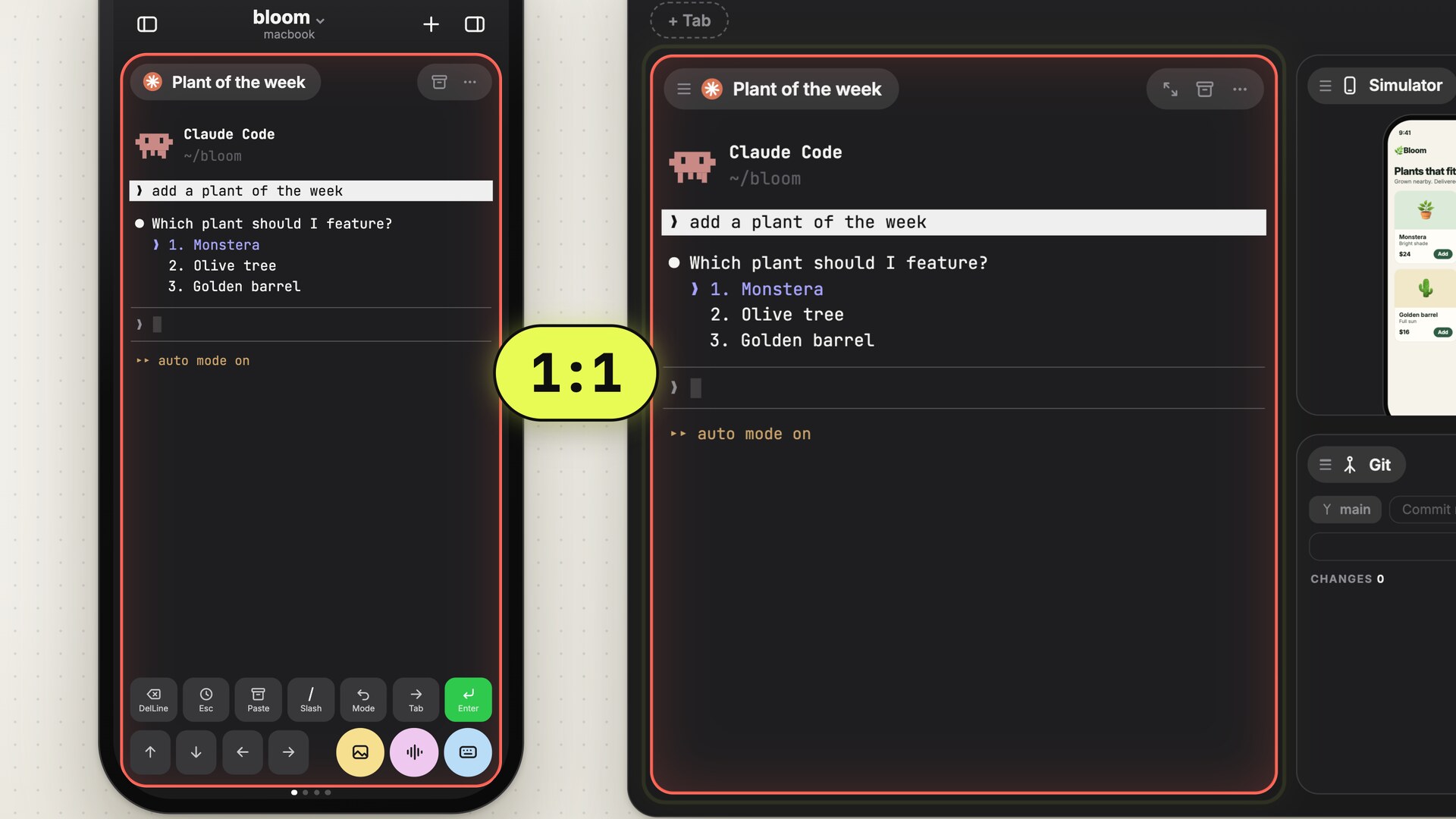
Offsite runs claude, codex, grok and a plain shell as sessions on your own host, a Mac or a Linux machine, and the Mac app and the iPhone app attach to the same sessions. What you see on the phone is the terminal running on the host, with the same input: type on the Mac and the phone shows each keystroke.
- Keys. The Command Bar sits above the keyboard with
Esc,Tab, arrows, DelLine andCtrl,ShiftandAltfor the next key, in a row of its own per tool. In an agent, Return starts a new line and Enter sends. - Network. The app races every path to the host, local network, Tailscale, a direct address and the relay, takes the first that answers and races again when the network changes; the film follows one session from home to a hotel and back. The sessions run on the host the whole time.
- Pictures. Upload from the Photo Library, the camera or Files. An image opens in an editor first, so you can circle what you mean; the file lands on the host and its path goes into the prompt.
- The result. The Browser card opens the dev server on your host’s
localhoston the phone. For iOS work on a Mac host, the Simulator streams as a card, and Deploy to this phone installs the build on the iPhone in your hand. The Git card shows the diff at phone width. - Notifications. A tap when a turn finishes or an agent waits for your input, straight into that session.
You set up the host and pair the phone from the Mac app, by scanning a QR code, with no account. Claude Code and Codex start with your own sign-in and configuration. A Mac host needs Apple Silicon and macOS 26, the iPhone iOS 18 or newer.
Side by side
| Where the agent runs | Agents | On the phone | |
|---|---|---|---|
| SSH app, tmux, mosh | Your machine | Any CLI | A terminal |
| Remote Control | Your machine | Claude Code | The Claude app |
| Cloud sessions | Anthropic’s cloud, repo from GitHub | Claude Code | The Claude app |
| Codex in ChatGPT | Your Mac or Windows PC, or the cloud | Codex | The ChatGPT app |
| Happy | Your machine | Claude Code, Codex, Grok | The Happy app |
| Offsite | Your Mac or Linux machine | Claude Code, Codex, Grok, shell | A terminal, with the Command Bar |
Pick by the work. A task that can run from a GitHub clone without your machine fits a cloud session. A Claude session that needs your local files fits Remote Control, and Codex on a Mac fits the ChatGPT app. For any CLI and a setup you assemble yourself, take an SSH app with Tailscale, tmux and mosh. If you run several agents side by side and want to try what they built from the phone, that is what Offsite is for.
FAQ
Can Claude Code run on the iPhone itself?
Claude Code runs on a computer or in Anthropic’s cloud. Every option here makes the iPhone a window onto that session.
Do I need a subscription or an API key?
Remote Control and cloud sessions need a claude.ai account; the docs exclude API keys. Over SSH and in Offsite, Claude Code runs on your machine with whatever sign-in it has there.
What happens when my phone loses signal?
The agent keeps working where it runs, on your machine or in the cloud. Mosh and Offsite reconnect on their own when the signal returns, and Remote Control reconnects once your machine is online.
New posts by email
An email when a new post is out, about Offsite and about working with coding agents.
You confirm your address once, and every email has an unsubscribe link. Sent with Buttondown, see the privacy policy.