Parallel agents and worktrees: where the debate stands, and how Offsite handles them
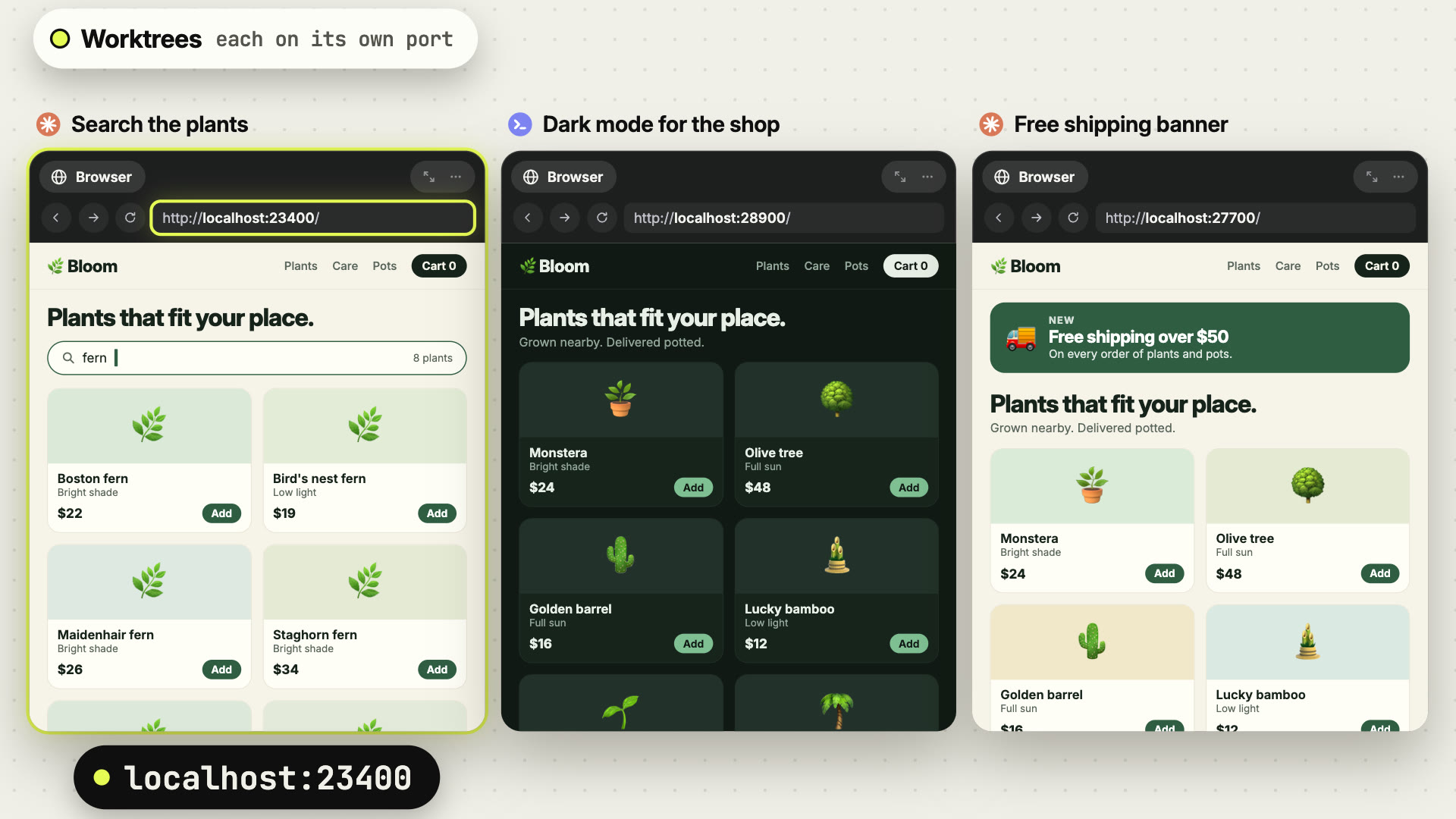
Two agents in one folder edit the same files and both want port 3000. A worktree per agent separates the code, and Offsite brings the dependencies, ports, setup and cleanup that each worktree needs.
You give one agent the search page and a second one the checkout, both in the same repository. A few minutes later the first one rewrites a file the second one is testing, the second one’s dev server fails to start because the first holds port 3000, and both have changed the lockfile. Parallel agents stop saving time the moment they share a folder.
The usual answer is a git worktree per agent: a second working directory on its own branch, sharing the repository’s history. It keeps the agents’ files apart. What a fresh checkout lacks stays with you: node_modules, the .env, a free port, the setup steps, and a way to get rid of the worktree once its branch is merged.
 1:30
1:30Where the debate stands
A worktree for every agent. Anthropic’s guide to running Claude Code in parallel isolates tasks that touch the same files in worktrees, and adds that “Running several sessions or subagents at once multiplies token usage.” The pnpm docs are direct: “When launching an AI agent, create a dedicated worktree for it.”
The code is apart, the running app is shared. Armin Ronacher wrote in June 2025 that running more than one agent means you have to “manage shared states like the file system, databases, or Redis instances”. For the file system “a second check-out will do”, and for the rest: “But really I don’t have an amazing solution yet.” Eric Allam of Trigger.dev describes the port problem in two sentences: “Your dev server runs on port 3030. Your second worktree also tries port 3030.”
One agent at a time. Mitchell Hashimoto ran his agents “one at a time, not in parallel”, because “Context switching is very expensive.” Dave Paola counts roughly N(N−1)/2 places for conflicts across N parallel branches and reports that conflict resolution was “eating 30-50% of parallel agent time”. His rule: parallelise across projects, sequence within one. Addy Osmani puts it shortly: “Your cognitive bandwidth doesn’t parallelize.” His ceiling is three to four threads per session.
One folder, many branches. Scott Chacon of GitButler keeps every Claude Code session in one working directory and lets hooks put each session’s changes on a branch of its own. With worktrees, he writes, you have to bootstrap each one, and you gain “the fun new ability to create merge conflicts with yourself”. Trigger.dev made the same move after they “spent more time on setup than shipping code”.
Review sets the pace. Simon Willison works from fresh checkouts in /tmp and names the limit of all of it: “how fast I can review the results.” What he runs in parallel is research, small maintenance and work he has specified in detail.
Read side by side, the five positions list the same costs. A fresh checkout has to be set up. Running apps collide on ports and databases. Branches collide when they merge. A person reviews every result. A worktree settles which files an agent edits, and the setup, the ports, the review and the cleanup decide whether a second agent pays off.
How Offsite handles each part
A worktree belongs to its project. In Offsite a worktree sits in a column to the right of its repository’s board. Open it, and its own board lies over the repository’s, with its agent, a Git card and a Files card, and room for more agents, terminals and browsers. Click another worktree to switch, or close it to return to the main checkout. You start one from the column, from a GitHub issue or pull request, or by telling an agent “Create a worktree and build the export”.
Ready before the agent starts. Offsite fetches the base branch, creates the branch and the folder, brings in the files the worktree needs and runs your setup commands. The agent starts once the setup has finished, with the task as its first message, and a notification says “Setup done” and “The agent starts now.”
Dependencies ready in seconds. Smart Copy brings the ignored files you list into the new worktree: node_modules, build caches, generated code. On APFS Offsite clones a whole folder in one clonefile call, on btrfs and XFS each file as a reflink, so the clone shares its blocks with the main checkout until either side changes them. A .env can come in as a link to the main checkout’s file, so a secret stays in one place. On other file systems Offsite copies the files. If your repository already has a .worktreeinclude, Offsite reads it as the list.
Every worktree its own ports. Each worktree gets a window of 100 ports, worked out from its branch name, and every app you run in it gets its port as $OFFSITE_PORT. In a monorepo the web app finds the API of the same worktree at $OFFSITE_RUN_API_PORT. A Browser card opened in a worktree goes to your project’s start page on that worktree’s port, so three versions of the same app run side by side. Offsite tells every agent in a worktree to start its own test instance, a database or a simulator, and to leave alone what it did not start.
Set up once. Smart Copy, the setup commands, the apps to run with their stop commands, and the clean-up steps make up a repository’s worktree setup. Write it yourself, or have an agent work it out: it reads the README, the lockfiles and the CI configuration, runs each command and starts each app once before it proposes the setup. Save it on the host, or write it to .offsite/worktree.json to share it with your team. From then on every new worktree runs it.
Finish from the Git card. In a worktree the Git card knows the way back to the base branch: update from the base, push, open a pull request, merge it. Conflicts, failing checks and review comments go to an agent with one click. Agents have tools of their own to update, publish, open a pull request and merge on your word, and they merge a pull request only once no check fails.
Every worktree in sight, deleted on your word. The column shows every worktree of the repository, including the ones you made in a terminal, in GitHub Desktop or with an agent’s own command, and one click adds such a worktree to the workspace. Host Settings › Worktrees lists the folders with their size and suggests the ones that look done: merged, no commits on top of the base, or no commit or checkout for 30 days. A worktree whose agent is still working stays off that list. Deleting one runs its clean-up steps and removes the branch once Offsite has proven that the merge, squash merges included, holds its changes, and on request the branch on origin too. Offsite suggests what can go, and you delete it with one click.
Working in the main checkout
If you work through one task after another, you work in the main checkout, and the worktree column appears with a repository’s first worktree. Paola’s rule fits Offsite as it is: every project is a workspace with its own board, so agents in different projects already work in different folders. A worktree is for the moment you hand two independent tasks in the same repository to two agents, and want to review each one on its own branch.
New posts by email
An email when a new post is out, about Offsite and about working with coding agents.
You confirm your address once, and every email has an unsubscribe link. Sent with Buttondown, see the privacy policy.