The Agent Browser: your agent checks its own work
Your agent builds a web app on your host, and to check it, it needs a browser there. The Agent Browser is that browser, on the agent’s own card, and you watch it work from your Mac or your phone.
Your agent writes a web app on your host. It reads its own code and runs its own tests, and it still cannot tell whether the page looks right, because nothing has opened it. To check its own work, it needs a browser on the machine it works on. And you want to see what it sees, even when you are somewhere else.
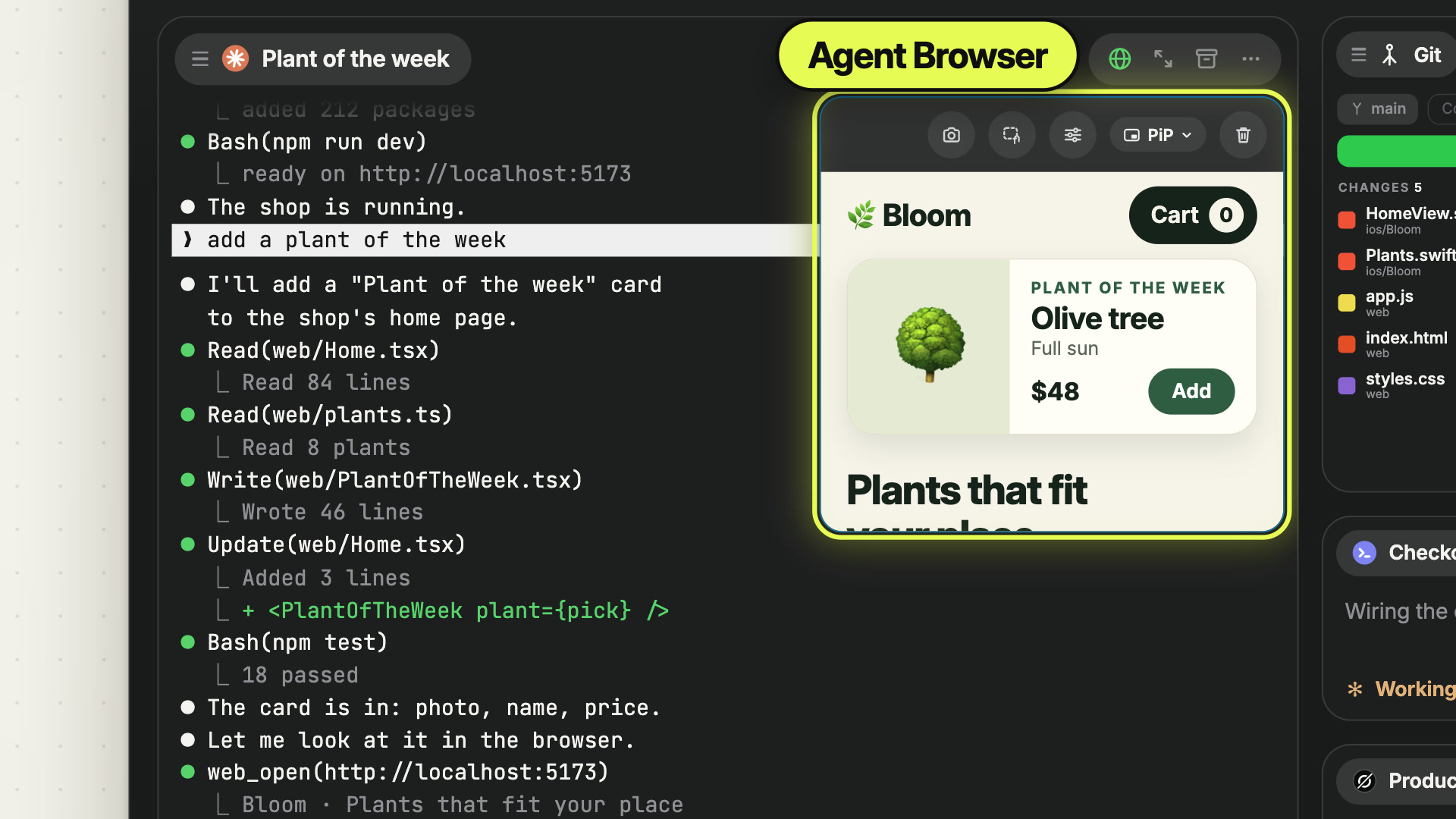
Offsite gives the agent that browser. The Agent Browser is a real browser on your host that the agent drives itself. It opens the page it just built, clicks through it and reads the result. The browser shows on the agent’s own card, so you watch the page change while the agent works, from your Mac or from your phone.
 0:50
0:50How it works
It’s built in. The agent gets the browser as tools from Offsite’s own MCP server. web_open opens a page, web_click, web_fill and web_press work it, web_screenshot takes a picture of it. No extension, no plugin. Agents without MCP have the same verbs as a command, offsite web open http://localhost:3000.
It reads the page as text. web_snapshot returns the page’s accessibility tree, one line per element, each with a ref like [e12]. The agent clicks and types by ref. A text tree costs a model far less than finding a button in a screenshot, and screenshots stay for the questions only pixels answer.
It lives on the agent’s card. The browser opens as a tile at the top right of the card of the agent that opened it. Ten agents mean ten browsers, each on its owner’s card. The tile’s pill docks the browser beside the terminal, to the right or at the bottom, makes it fill the card, or opens it as a card of its own. The globe in the card’s action pill hides it and brings it back. Each of your devices keeps its own layout.
It tries every screen size. The agent switches the viewport with web_viewport. Responsive follows the size of the card; a device from the catalog, such as iPhone 15 at 393 × 852 or iPad at 820 × 1180, comes with touch input. The page lays itself out anew for each one, so the agent checks the phone layout without a phone.
You watch it from any device. The browser runs on the host and streams its picture to the devices you have open. A pointer and a click ripple show where the agent acts. On your iPhone the browser is a small tile on the agent’s card. Tap it, and the page fills the screen, laid out for the phone.
It holds none of your logins. Every Agent Browser card has a browser profile of its own on the host, so the agent starts in a known state with nothing of yours in it. Closing the card ends the browser and deletes its profile. The Browser Use switch in Host Settings decides whether agents get the web tools, and it is on by default. For your own accounts there is the Browser card, which no agent can reach.
New posts by email
An email when a new post is out, about Offsite and about working with coding agents.
You confirm your address once, and every email has an unsubscribe link. Sent with Buttondown, see the privacy policy.